


Moovago Connect: The Link Between the Principal and Field Agents
The only CRM platform that brings together the company, external agents, and the sales force.
- View the contacts in your shared customer database on an interactive map.
- Share your report and document history from the application
- Assign tasks to the rest of the sales team
- Easily access sales revenue and client reports
- Available on web browser, smartphone and tablet.
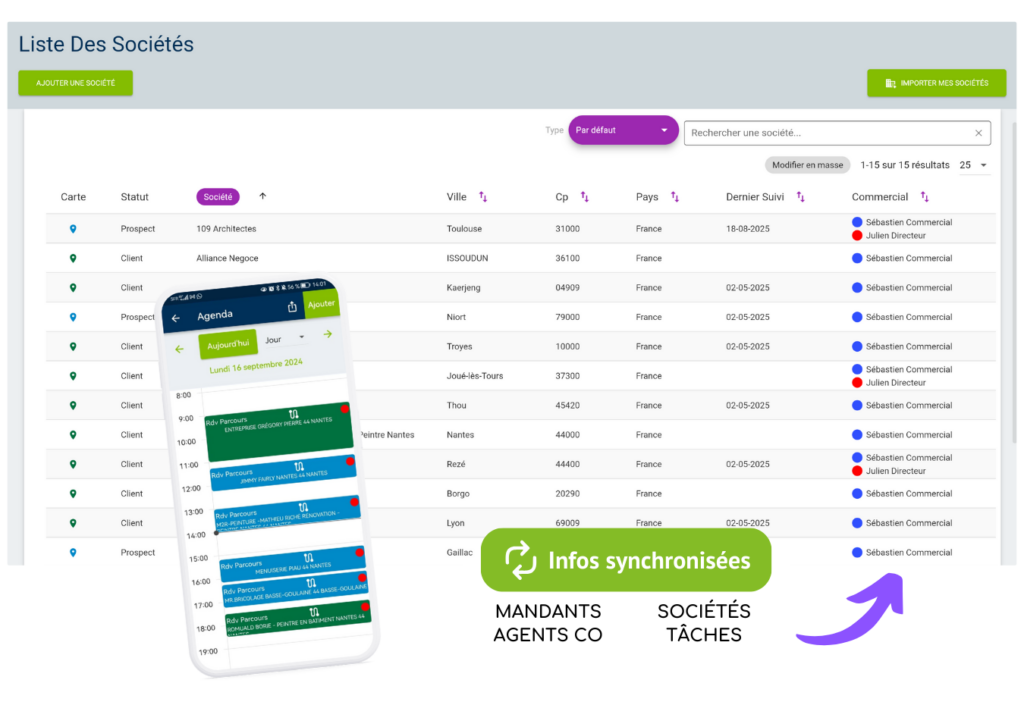
Moovago Connect: The Smart Link Between Moovago Accounts
Moovago Connect allows you to connect multiple Moovago accounts —including those of companies, partners, or external teams—within a single ecosystem, without ever mixing data. Each user retains their own space, rules, and privacy, while benefiting from shared access to information that helps them work more efficiently in the field.
Designed for distributed sales organizations, Moovago Connect streamlines collaboration, eliminates duplication, and transforms field data into a powerful driver of collective performance.
Learn More: Advanced Options Available with Moovago Connect
- Business tracking: Track the Progress of Sales Opportunities
- Catalogue: Products, Samples, and POS Materials—Always Up to Date
- Sales revenue: View performance metrics
- Dashboards: View activity within a specific scope
- View and highlight field operations in real time
Thanks to Moovago’s interactive mapping, data shared between accounts appears instantly on the map. Everyone sees what’s relevant to them, at just the right time.
- Coordinate seamless customer follow-up
Moovago Connect lets youassign tasks, sendreminders, and share appointments across connected accounts.
No more scattered emails or missed deadlines: every action is integrated directly into the customer tracking system.
- Standardize data quality
Thanks to segmentation and shared keywords, customers and prospects are qualified consistently. This makes it easier to organize portfolios, improves data clarity, and saves valuable time for all users.
- Centralize documents and repositories
Provision of shared resources: sales scripts, product sheets, sales materials, and procedures. Everyone works with the same information, which is always up to date.
Centralize field data without mixing it up
Moovago Connect lets you link multiple Moovago accounts while keeping them separate.
Everyone works in their usual environment, with shared access only to the information needed for collaboration.
- Linking accounts without merging data,
- Separate, clearly defined workspaces,
- Information shared in real time,
- Respect for everyone’s rules and boundaries
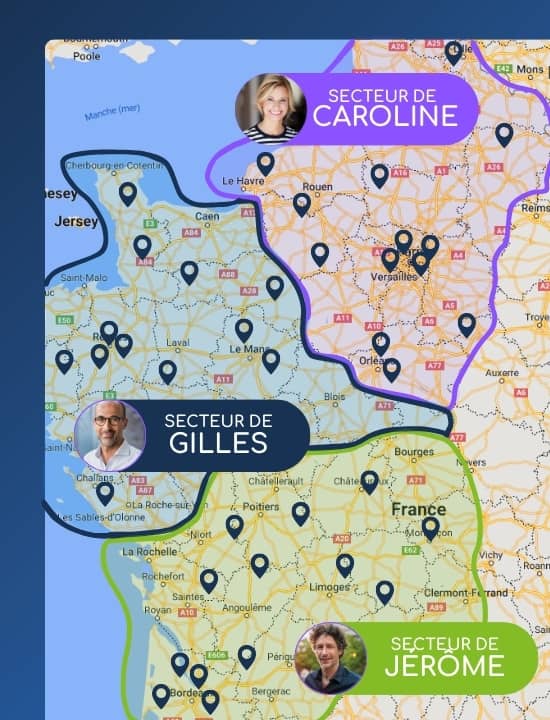
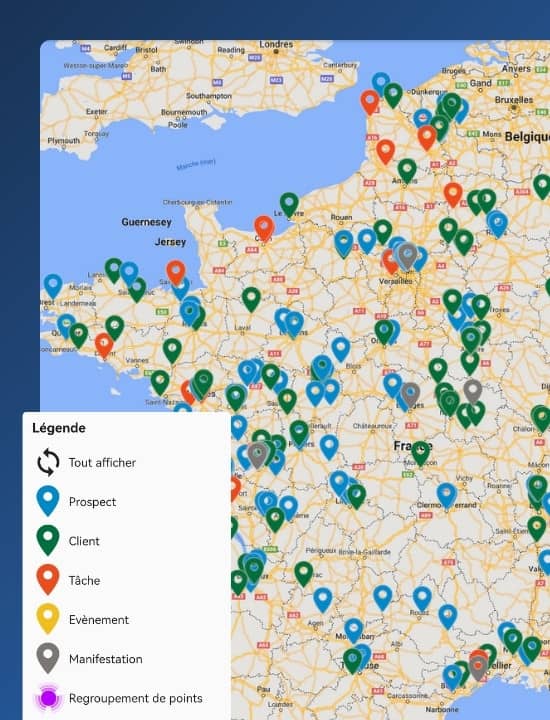
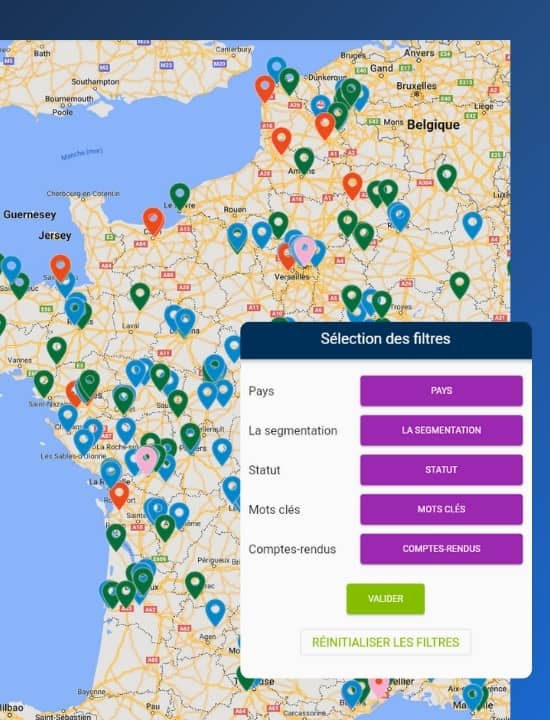
View sales activity on a shared interactive map
Moovago mapping really comes into its own in the context of connected accounts. Companies, prospects, customers, and appointments appear on an interactive map, enriched by data updated by the various stakeholders:
- A shared, up-to-date map view,
- Data visible based on the defined permissions,
- A better understanding of the areas covered,
- Measurable results from prospecting and follow-up activities.
All in a single tool, accessible from any device, at a price everyone can afford.
Get a clear overview of roles and scopes at a glance
With the ” Companies” view, it’s easy to see who works with whom. Assignments are visible, easy to understand, and adaptable, even in complex organizations:
- A clear overview of the relationships between companies and sales representatives,
- Quick overview of the areas of operation,
- A structured organization, even with multiple stakeholders,
- Reducing Misunderstandings and Duplicate Work

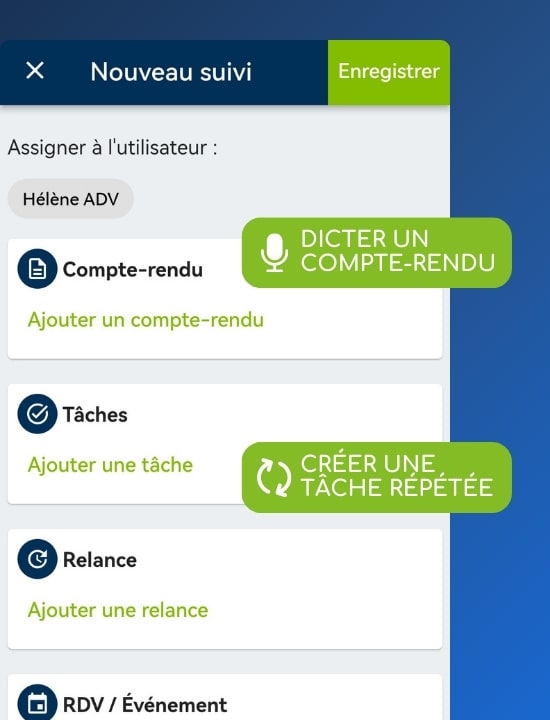
Coordinate customer follow-up without increasing the number of interactions
Moovago Connect allows youto assign tasks, reminders, or follow-up actions between connected accounts.
Information flows directly within the tool, without relying on emails or external files:
- Assigning tasks and follow-ups,
- Shared, traceable tracking history,
- Fewer oversights, greater continuity in customer relations,
- Structured follow-up, accessible at any time
Getting Started with Moovago Connect
How can you start working closely with your partners?
Step 1:
You're satisfied with Moovago
You've been using Moovago for a while, or you just signed up.
Step 2:
You'd like to collaborate with external partners
Discuss this with your sales staff.
Step 3:
Contact the Moovago team
Our team will then connect your session with your partner's, based on your needs.
Step 4:
You're ready to start collaborating!
Keep focusing on your customers and let Moovago save you time.
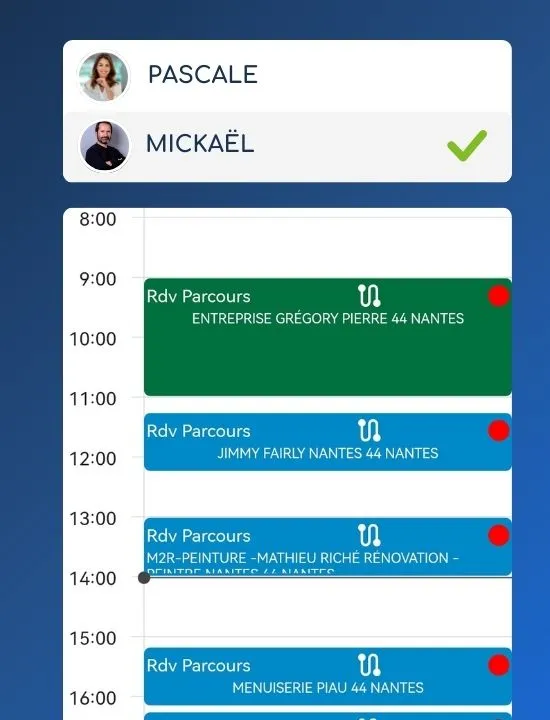
Share appointments and sync calendars
- Transferring appointments between linked accounts,
- Add participants or pairs as needed,
- Calendars that are always up to date,
- Better coordination of field operations
Harmonize data classification and organization
Moovago Connect allows you to share common qualification rules: keywords, segmentations, and classifications.
- Shared segmentation of companies and prospects
- More consistent and comparable data,
- Saves time when sorting portfolios,
- A reliable common foundation for working together
Data becomes more consistent, which makes it easier to analyze and organize on a daily basis.
A Sales Collaboration CRM for Everyone
Client Companies of
, principals
- Companies that manage a network of independent sales representatives or external partners.
- Real-time field visibility: Access reports and track your agents' progress.
- Centralized reporting: Analyze the performance of each independent sales representative or sales territory.
- Seamless information sharing: no more email exchanges—everything is in Moovago.
- Access Control: Choose which data each agent can view.
- Saves administrative time: Data is automatically uploaded without the need for duplicate entry.
Independent Sales Representatives
- Independent sales representatives for several companies.
- One tool for all your principals: Manage your principals and reports in a single place.
- Automatic Sharing: Send your viewings and sales directly to your principals.
- Smart Synchronization: No more Excel spreadsheets—your data is always up to date.
- Showcase your work: your principals can see your actions and results firsthand.
- Comprehensive mobile application: all your tracking right in your pocket, even when you're offline.
Outsourced sales forces
- Third-party sales providers or outsourced sales teams.
- Multi-client management: one dashboard per brand or per project.
- Direct communication with the principal: centralized information exchange, reporting, and feedback.
- Structured project tracking: reports, tasks, and follow-ups organized by client.
- Transparency and traceability: Your principals can track your performance without being asked.
- Simplified collaboration: Everyone works on the same database, in real time.
"Moovago allows us to centralize information and facilitates teamwork within the company: field sales representatives create their reports directly in the application. Information is immediately relayed to the in-office sales team, enabling excellent responsiveness in customer follow-up—with the same level of detail."
"After testing several customer tracking software solutions for sales reps, Moovago proved to be the most effective, simple, and quick to use! Customer tracking, task management, round optimization... We highly recommend Moovago!"
“Moovago is the sales management tool we’ve been dreaming of for a long time! Simple, intuitive, and seamless, it lets us devote more time to sales activities while ensuring regular sales follow-up. It’s constantly evolving to become more efficient. Whether you’re working alone or as part of a team, it’s the essential tool for effective sales follow-up.”
"A simple, practical and user-friendly application! A company that listens and has been able to develop the application according to our needs. For us, it's an essential tool for monitoring and leading our field teams... And an undeniable asset for presenting our products to our customers!

Why choose Moovago?
- Moovago is an all-in-one sales CRM, designed for field sales representatives and recommended by many sales professionals in Europe:
- Affordable rates for freelancers, VSEs and SMEs
- Telephone assistance from a dedicated advisor
- Secure data, hosted in France
- Help Center with web and mobile video tutorials, available 24 hours a day
- Support for internal software adoption
- Listening to needs & continuous improvement
Learn more about Moovago
Mapping
Display your customers and prospects on an embedded interactive map
Rounds
Quickly create a round plan that includes different companies
Customer Follow-Up
Prioritize your visits, tasks and reminders according to your own indicators.
Agenda
Centralize all your customer appointments in a single tool
Sales revenue
Clearly visualize your sales revenue with graphical charts
FAQ on Moovago's Connect Feature
What are the specific advantages of Moovago Connect compared to a traditional CRM?
The two-way connection between the principal and the agent, the centralization of field data, and the user-friendly design tailored for field sales representatives.
A traditional CRM operates within a single organization. Moovago Connect, on the other hand, enables multiple independent entities to collaborate while each retains ownership of its own data. Moovago is the only sales CRM for field sales representatives to offer this feature, designed for distributed sales ecosystems.
How does the link between a principal account and an agent account work?
Moovago Connect allows you to create a voluntary link between two separate Moovago accounts. The two accounts are linked through a simple authorization process, carried out internally by the Moovago team upon request from either party.
This connection defines the scope of information that can be shared, without merging accounts or mixing data. Each party retains its own workspace, personal settings, and visibility rules.
Is the data shared between the principal and the agent secure?
Yes. Data transfers between accounts are conducted over a secure connection. Each party retains ownership of its data, and Moovago ensures that data sharing is encrypted and limited to authorized information.
Can agents represent multiple principals in Moovago?
Yes. A single Moovago account can be used to represent multiple principals and can even be linked to multiple partners, each via a separate connection. This allows you to manage multiple business relationships without mixing up data or transaction histories.
Is Moovago Connect free?
Moovago Connect is included with Moovago, regardless of the plan you choose. For more information about Moovago’s plans, visit our Pricing page.
Certain Moovago features, which are not included in the basic plan, can also be shared within a company. The goal remains to provide a simple connection, free of unnecessary complexity.
If you’d like to set up a Connect link with a business partner who isn’t yet a Moovago user, no problem! All they need to do is create an account in just a few minutes on this page. Plus, they’ll be able to enjoy a 15-day free trial of all of Moovago’s paid features.